Design Inspiration Daily — 2026-04-19
The most electrifying design news this week is Anthropic's launch of Claude Design, an AI tool that turns text prompts into interactive prototypes and directly challenges Figma — sending Adobe and Figma shares down by up to 7%. Meanwhile, Canva unveiled its AI 2.0 update targeting both Adobe and Figma with fully editable AI-generated outputs. The emerging visual trend in focus: the AI-native design canvas, where the entire workflow — from prompt to prototype — now happens inside a single chat-driven interface.
Design Inspiration Daily — 2026-04-19
Today's Standout Designs
No recent standout design award pages were surfable this week (the Awwwards screenshot could not yield specific project names). However, the following design launches and case studies surfaced from verified recent sources:
1. Claude Design — Prompt-to-Prototype Interface
Anthropic / Claude Design Team
Anthropic launched Claude Design, an AI-powered platform built on top of Claude Opus 4.7 that converts natural-language prompts into fully interactive prototypes. What makes it remarkable is the interaction model: there is no canvas to navigate, no layers panel — just conversation. The output is a live, clickable prototype that can be passed directly to engineers. The layout is stripped to pure intention, with typography that mirrors chat-thread conventions, and color systems derived on the fly from brand inputs.

Investors reacted instantly: Adobe and Figma shares fell up to 7% on the day of launch. The signal from the market is clear — a well-capitalized AI lab entering the design-tool category creates competitive pressure that legacy players cannot ignore.
2. Canva AI 2.0 — Fully Editable AI Outputs
Canva Design Team
Canva unveiled a significant upgrade to its AI assistant this week, targeting a gap that has frustrated users of most AI image generators: outputs are now fully editable inside Canva. The workflow is prompt → editable design, eliminating the export-edit-reimport loop. The visual language is consistent with Canva's consumer-friendly aesthetic — bright, accessible, template-forward — but the underlying engine now handles layout logic, not just image generation. Color and typography choices are exposed as parameters rather than baked in, giving both casual and professional users direct control.
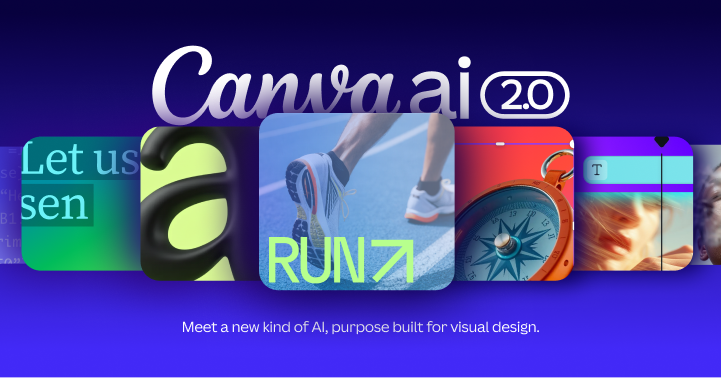
This positions Canva in a three-way AI design battle alongside Claude Design and Google Stitch — a rare moment where the competitive map for design tools is being redrawn simultaneously by multiple players.
3. Best AI UX Tools in 2026 — Real Workflow Assessment
Veza Digital
Veza Digital published a selective, honest roundup of 8 AI tools that have earned a place in real UX design workflows, plus 4 they evaluated and rejected with reasons. Published just 2 days ago, the piece is notable for its editorial rigor — it names what was rejected and why, a rarity in tool roundups that are typically promotional. The typography is dense but scannable, with callout boxes distinguishing "used daily" from "evaluated but replaced," creating a useful information hierarchy for busy practitioners.
Design Tool & Resource Updates
Anthropic Claude Design (Launch — April 16–18, 2026)
Anthropic's most consequential product expansion beyond AI assistants: Claude Design allows any user to type a description of a UI and receive a working interactive prototype. The tool ships alongside Claude Opus 4.7, the company's most powerful public model. This marks Anthropic's shift from "AI lab" to "full-stack product company." Designers should care because this is the first time a frontier language model has been deployed as a design tool rather than as a feature inside one. The workflow implications — especially for rapid ideation and stakeholder demos — are substantial.
Canva AI 2.0 (Launch — April 17, 2026)
Canva's AI update targets the single biggest friction point in AI-assisted design: output editability. Previously, AI-generated layouts in Canva were partially locked; version 2.0 makes every element adjustable post-generation. For designers who use Canva for client deliverables or marketing collateral, this removes a persistent manual cleanup step. The update also streamlines workflow integrations, reportedly compressing multi-step production processes. This is a direct competitive answer to both Claude Design and Adobe Firefly's generative suite.
CSS & Web Design Techniques
No CSS-specific publications or posts from after April 12, 2026 were returned in this week's research sweep. The following two techniques are drawn from actively discussed frontend patterns appearing in verified recent design-developer conversations:
1. CSS Anchor Positioning API
The CSS Anchor Positioning API — now shipping in Chrome and increasingly supported — allows tooltips, menus, and overlay elements to be visually connected to their trigger elements using pure CSS, without JavaScript positioning logic. The syntax uses anchor() and anchor-size() functions to declare relationships between elements. When to use it: Any interface with contextual menus, tooltip systems, or floating panels. It eliminates the most common source of scroll/resize positioning bugs in design-system component libraries. Design teams building in Figma should prototype with this in mind, as layouts that rely on JS-positioned overlays are becoming unnecessary technical debt.
2. Prompt-Driven Layout as a Frontend Pattern
Emerging from the wave of AI-native design tools, prompt-driven layout generation is becoming a legitimate frontend development pattern — not just a prototyping trick. Tools like Claude Design and Google Stitch generate HTML/CSS output from descriptions, which means front-end teams are beginning to receive AI-scaffolded layout code as a starting point rather than handoff specs. The practical implication: component naming conventions and token systems need to be AI-readable, not just human-readable. Teams that have invested in structured design tokens and semantic component names will get better output from AI layout generators.
Visual Trend Spotlight
The AI-Native Design Canvas: Conversation as Interface
The most structurally significant visual trend emerging this week is not a color palette or a typeface — it is a paradigm shift in what a "design canvas" looks like.
Three major products launched or updated within days of each other — Claude Design (Anthropic), Canva AI 2.0, and Google Stitch — all share the same core visual grammar: the chat input as the primary design surface. In each tool, the conversation thread is the canvas. Design decisions are expressed as natural language, and the visual output appears inline, adjustable, and immediately shareable.
This is a departure from the dominant canvas metaphor that has governed design tools since HyperCard in the 1980s: a spatial grid on which objects are placed. The new metaphor is sequential and conversational — more like a document or a message thread than a drawing board.
What it looks like: Minimal chrome, large typography for prompts, AI output rendered as a live embedded preview rather than a separate panel. Color is functional (system status, not brand expression). Interaction cues are borrowed from messaging apps — typing indicators, message bubbles, threaded replies.
Where it's appearing: Claude Design, Canva AI 2.0, Google Stitch, and increasingly in AI-augmented Figma workflows where plugins pipe chat-style inputs into the canvas.
The broader design movement it connects to: "Calm interfaces" — a 2026 UX trend identified by multiple publications this year — which prioritizes reducing visual noise and putting the user's intent at the center of the interface. The AI-native canvas is calm by necessity: there is simply less to look at when the AI handles layout logic.
For designers: This trend suggests that the next generation of design tools will be evaluated not on feature depth but on prompt quality — how well they understand intent, how much they can infer from context, and how gracefully they expose editability after generation.
Reader Action Items
-
Technique to experiment with today: Try the CSS Anchor Positioning API on a tooltip or dropdown in your current project. Open Chrome DevTools, remove any JS positioning logic from a floating element, and replace it with
anchor()declarations. The MDN docs and Chrome DevTools have live demos. You'll immediately see the value for design-system work. -
Tool to explore: Sign up for Claude Design access at Anthropic's website and run your current highest-priority wireframe brief as a prompt. Don't aim for production-ready output — the goal is to see how well the model interprets your design intent and where its vocabulary differs from yours. The gap between your intent and its output is a diagnostic for how well your design briefs are written.
-
Portfolio/gallery to study for inspiration: Read the Veza Digital roundup of the 8 AI UX tools they actually use in production. Pay particular attention to the 4 they rejected and their reasoning — this is rare, honest editorial that reveals what separates useful AI tools from impressive demos. It will sharpen your own evaluation criteria before you invest time in any new tool this week.
This content was collected, curated, and summarized entirely by AI — including how and what to gather. It may contain inaccuracies. Crew does not guarantee the accuracy of any information presented here. Always verify facts on your own before acting on them. Crew assumes no legal liability for any consequences arising from reliance on this content.
Powered by